Automatic Incident Detection

Automatic Incident Detection (AID) for Highway Control Rooms

Automatic incident detection (AID) is software that watches live traffic camera feeds and raises an alert when something on the road needs an operator. GoodVision Live Traffic delivers AID as scenarios you configure per camera, for highway and tollway operators and traffic management centers. Each event reaches your systems over HTTPS in under a second.

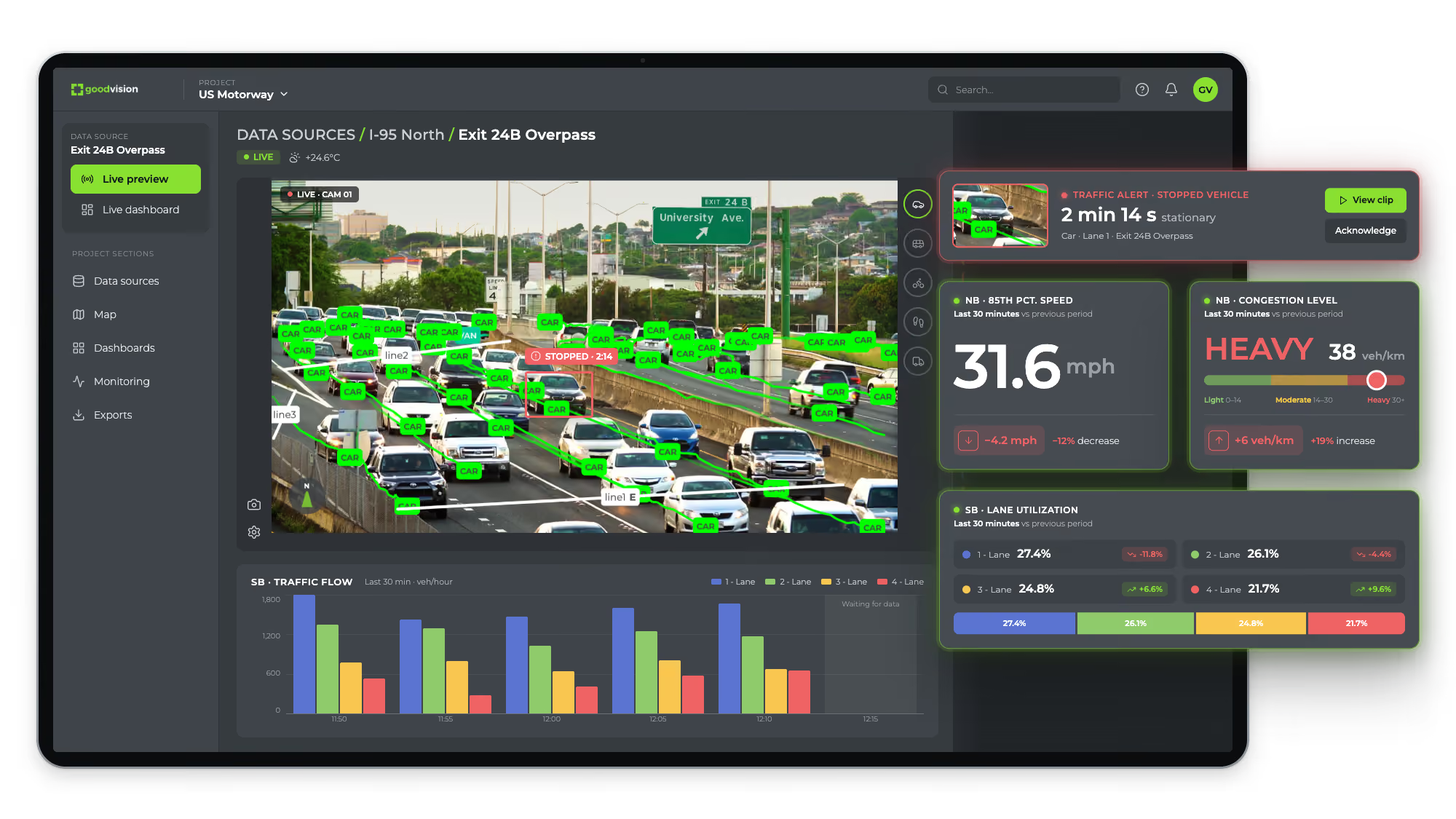
GoodVision Live Traffic live preview of a highway CCTV camera, detecting every car and raising a stopped-vehicle alert beside speed, congestion and lane utilization widgets
How It Works

How Does Automatic Incident Detection Work?

GoodVision Live Traffic reads the live stream from each camera, then detects, classifies and tracks every road user in it. It checks that movement against the scenarios you defined for the camera. When a scenario fires, it creates an event and sends it to your operators or your ITS systems in under a second.

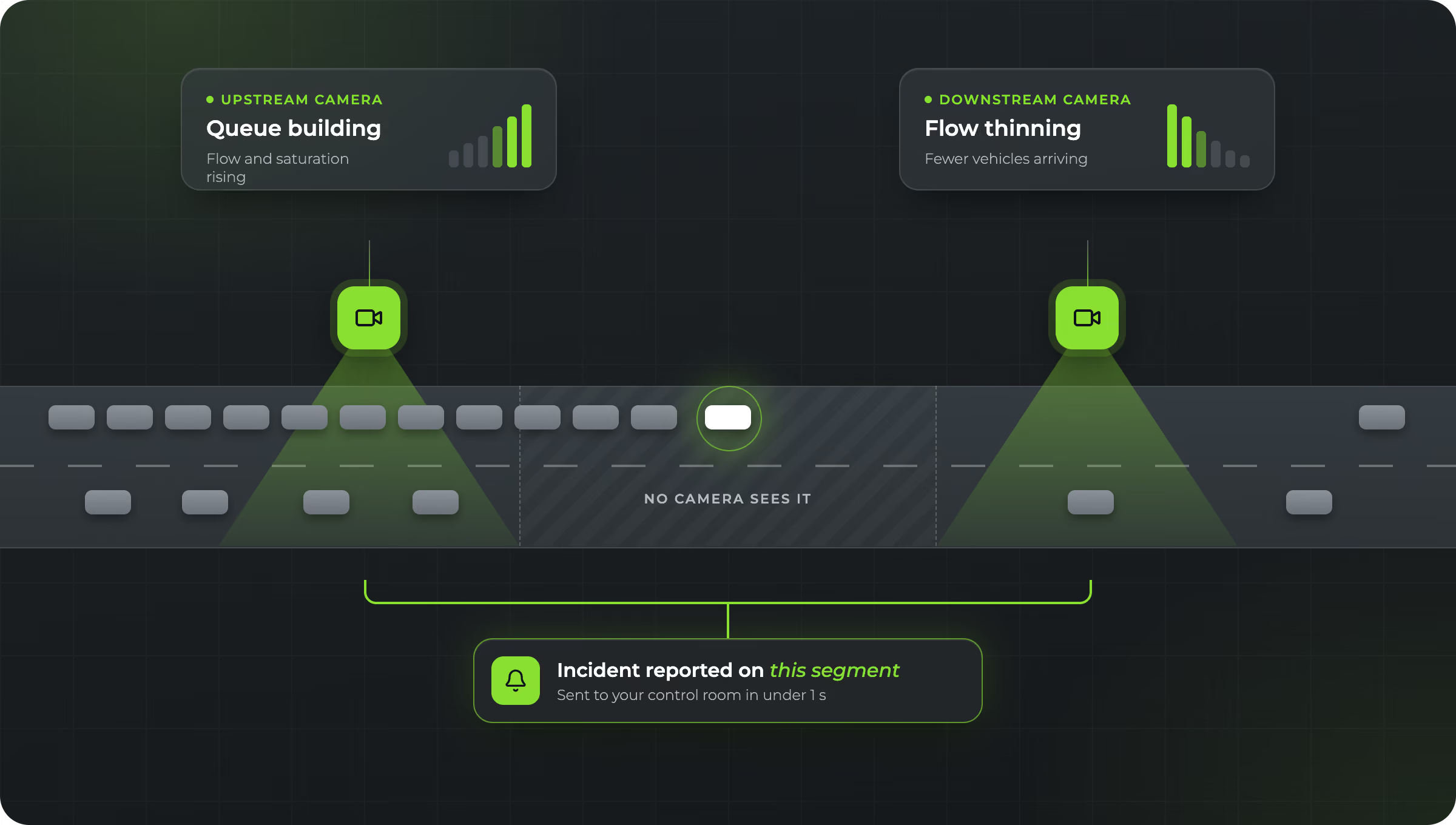
Diagram of an upstream and a downstream camera point, where flow rising at one and thinning at the other flags a stopped vehicle on the segment between them

1. Read the Stream

Standard RTSP video from your cameras, in H.264 or H.265, at 10 to 50 frames per second.

2. Detect and Track

Every vehicle, pedestrian and cyclist in the view, tracked continuously, day and night and in all weather.

3. Evaluate Scenarios

Each track is checked against the rules you set for that camera, by direction, lane and vehicle class.

4. Raise the Event

The event goes to your control room, dashboards or traffic management system over HTTPS in under a second.

AID Runs Inside Live Traffic

AID is part of GoodVision Live Traffic and runs on the same traffic scenarios, so each incident type is a scenario you create on a camera. The cameras that detect incidents also count traffic and measure flow, which is what real-time traffic monitoring covers.

Event Types

Which Incidents Can GoodVision Automatically Detect?

Five incident types run in production today, and each one maps to a named scenario in GoodVision Live Traffic. You switch on the scenarios each camera needs. Near-misses are measured separately, in the Traffic Safety Suite. Scenario availability is configured per project, so ask which scenarios your deployment carries.

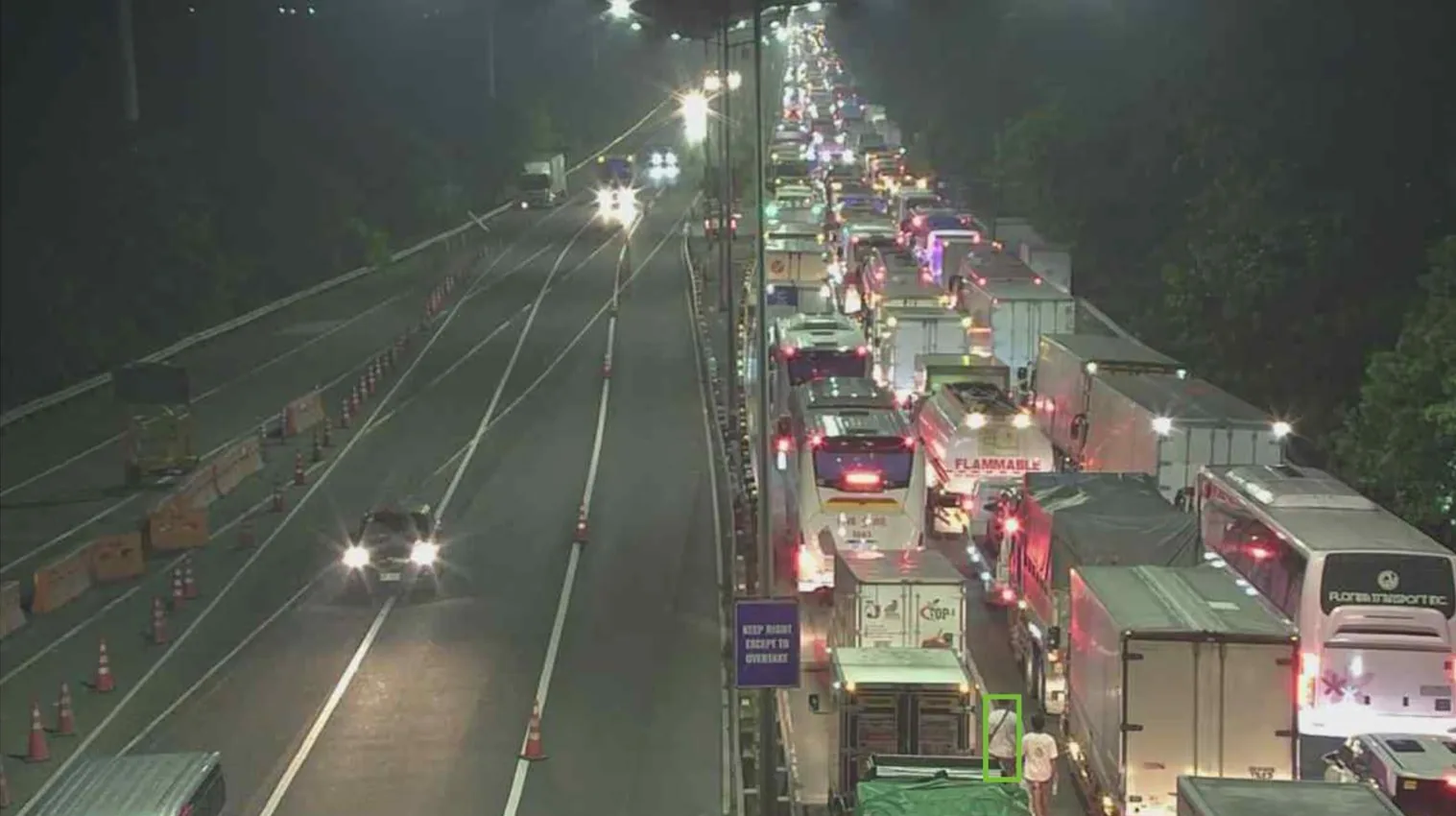
Night-time highway camera frame with a queue of stopped trucks and buses and a person on the carriageway marked by a detection box

Wrong-Way Driving

Delivered by the wrong-way driving scenario. A vehicle moving against the permitted direction in a lane you define raises an event.

Stopped and Broken-Down Vehicles

Delivered by the vehicle stop detection scenario. A vehicle that stops in a zone you draw, such as a running lane or the shoulder, raises an event.

Congestion

Delivered by the congestion detection scenario. It reports the congestion level for each lane, banded Light, Moderate and Heavy.

Speed Limit Violations

Delivered by the speed limit violation scenario. Measured speed is checked against the limit you set.

Fire, Smoke and Debris

Delivered by a dedicated visual model that cut false positives enough for production use.

Near-Misses, Measured Separately

Post-encroachment time (PET) and time to collision (TTC) score conflicts between road users in the Traffic Safety Suite.

What AID Detects Around an Incident

AID detects the conditions around an incident, such as a stopped vehicle, a wrong-way driver or a lane going to Heavy congestion. Your operators confirm what happened from the event snapshot. Need to catch a different kind of event on your road? We can build a scenario for it on your cameras.

Configuration

How Do You Configure AID for Each Camera?

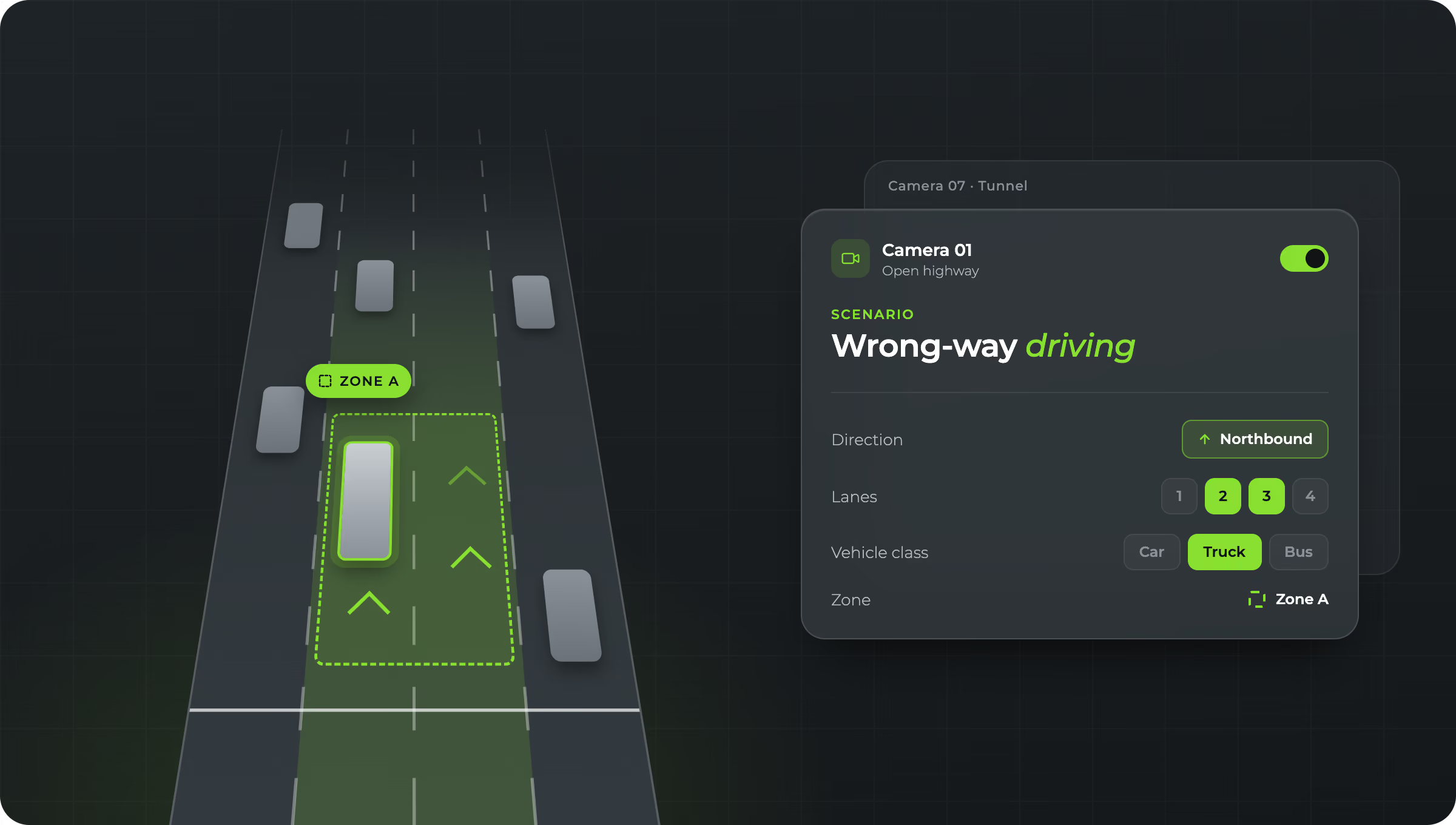
You set each scenario for the camera it runs on, with its own lanes, directions, zones and vehicle classes. A tunnel and an open stretch of highway get different rules.

Highway CCTV frame in GoodVision with a detection zone outlined in red and tracked vehicles marked in green

Direction

Define the permitted direction per lane, so wrong-way detection fires only on traffic moving against it.

Lane

Apply a rule to one lane or several. Congestion is reported for each lane, so you see which lane is backing up.

Vehicle Class

Limit a rule to the road users it concerns, for example a speed rule for heavy vehicles only.

Lines and Zones

Draw counting lines and detection zones over the camera view, and move them later without roadworks.

Cameras and Magnetic Loops

AID works with existing camera systems and magnetic loops, so you add detection to the equipment already on the road.

One Camera to Thousands

Start on a single camera and extend to the whole network on the same platform and configuration.

Alert Routing

Where Do AID Alerts Go?

Each AID event goes where your operators already work. GoodVision Live Traffic sends alarms, notifications and structured data over HTTPS in under a second, to traffic controllers, dashboards, traffic management systems and third-party platforms. The REST API also returns the image snapshot for each detected event.

Traffic Management Centers

Events into the control room software and the ATMS your operators already use.

Emergency Response Systems

Incident events routed to the services that dispatch a response.

V2X Platforms

Events passed to connected-vehicle platforms for drivers approaching the scene.

Smart City Platforms

Incident data joined with the rest of your city or regional systems.

Public Transportation Systems

Incident data for the operators running services on the affected road.

Data Analytics Platforms

Events and traffic data exported to your own data lake for later analysis.

A Record of Every Event

Every scenario can feed an Event List widget on a dashboard and an Event Report in .xls format, which lists individual events with precise timestamps and parameters. The REST API returns image snapshots for detected events, so an operator can check what the camera saw. Speeding events can also feed a wider enforcement program, see traffic violation detection.

Questions

Questions About AID Systems

These answers cover what highway operators and traffic management centers ask first about an AID system: what it is, what it detects, which cameras it needs, where the processing runs, and how it connects to prediction. Each answer is short and gives you the facts behind it.

What Is an AID System?

An automatic incident detection (AID) system watches traffic camera feeds and alerts an operator when an incident needs attention. GoodVision delivers AID in Live Traffic, as scenarios on existing CCTV or supported AI cameras, with alerts in under a second.

Does GoodVision Detect Crashes?

No. It detects stopped vehicles, wrong-way drivers, congestion, speed limit violations and fire, smoke or debris. It measures near-misses with PET and TTC.

Do We Need New Cameras?

Usually not. GoodVision reads standard RTSP streams in H.264 or H.265, from 640x480 up to 1920x1080, at 10 to 50 frames per second. Vehicles need to fill at least 5% of the camera view. GoodVision is camera-agnostic and works with cameras of any brand.

Where Does the Processing Run?

On an edge device next to your cameras, on your own GPU server, or inside a supported AXIS® camera with a DLPU. GoodVision is software, so you choose the hardware.

How Does AID Relate to Predictions?

AID works from the day a scenario is live. Predictions come later, after a three-month calibration on your own data. See predictive analytics.

Where Can I See the Full Highway Picture?

The highway and tollway operators page shows how AID fits with toll plazas, tunnels, work zones and the rest of your network.

Test Incident Detection on Your Own Cameras

Send us a stream or a recording from one of your highway cameras and we will show you which events GoodVision raises in it.