
Real-Time Traffic Video Analytics on Live Camera Streams
GoodVision Live Traffic is real-time traffic video analytics software. It reads live streams from your existing CCTV or from a supported camera running Live Traffic, detects and tracks every vehicle, cyclist and pedestrian, and turns what it sees into counts, speeds, incidents and violations. Highway operators, cities and system integrators receive each event over HTTPS as soon as it is detected.
Live Traffic by the Numbers
What Does Live Traffic Detect and Measure?
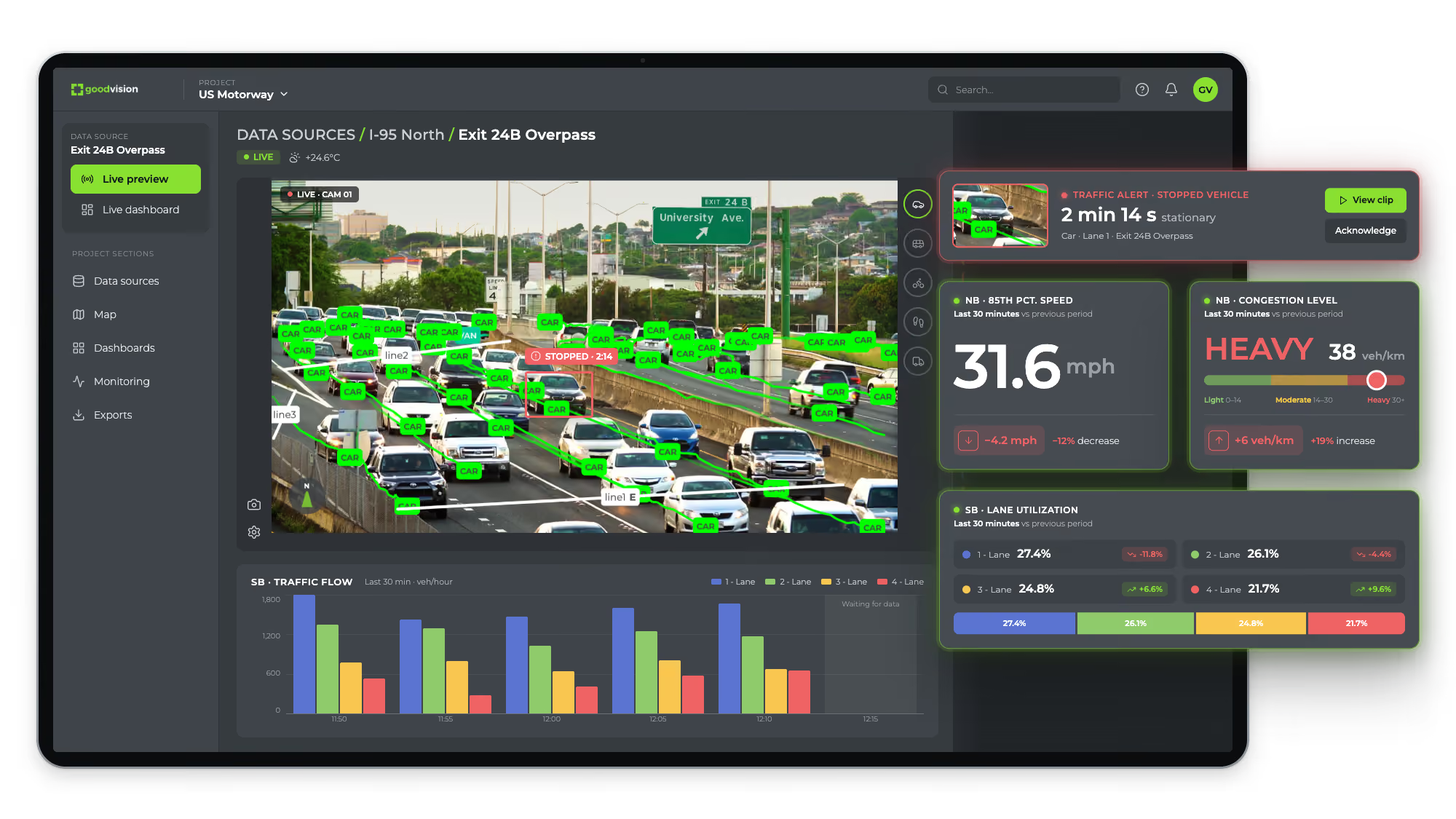
Live Traffic detects, classifies and tracks every road user in each camera view, continuously, and checks their behavior against the scenarios you configure. It measures traffic, detects incidents and violations, and scores near-misses. You set each scenario by direction, lane and vehicle class, so an event means what your operators need it to mean.
Counts and Flow
Vehicles, bicycles and pedestrians counted per lane, approach and zone, with traffic flow and density over time.
Speed and Time Gap
Average and 85th-percentile speed and the gap between vehicles, per lane, through highway flow monitoring.
Congestion
Congestion level for each lane, banded Light, Moderate and Heavy, plus toll lane capacity at the plaza.
Incidents
Wrong-way drivers, stopped vehicles and congestion, raised as live events by automatic incident detection.
Violations
Speed limit violations and illegal parking on the same cameras. See violation detection.
Near-Misses
Post-encroachment time and time to collision, scored live. See road safety analysis.
Crash Risk and Scenario Availability
GoodVision measures near-collisions with PET and TTC, so you can act on risk before a crash happens. Scenario availability is set per project, so tell us which events you need and we will confirm them for your cameras.
How Does Multi-Camera Tracking Work at an Intersection?
Multi-camera tracking in GoodVision Live Traffic joins every camera at an intersection into one data source. You calibrate each camera to a shared map, and Live Traffic tracks every road user across all the camera streams. You get counts and turning movements for the whole intersection, on one live map.
One Live Map for Every Camera
Calibration points tie each camera to the map and to the cameras beside it. Live Traffic then shows the intersection as one site, with one combined coverage area.
Every Road User Tracked Across Streams
Vehicles, cyclists and other road users stay tracked as they cross from one camera view into the next, through every approach and every turn.
Turning Movements for the Whole Intersection
You draw counting lines straight on the map. Directional and multiline counts cover every movement through the intersection, by road user class, on live dashboards. See intersection monitoring.
How Do Events and Data Reach Your Systems?
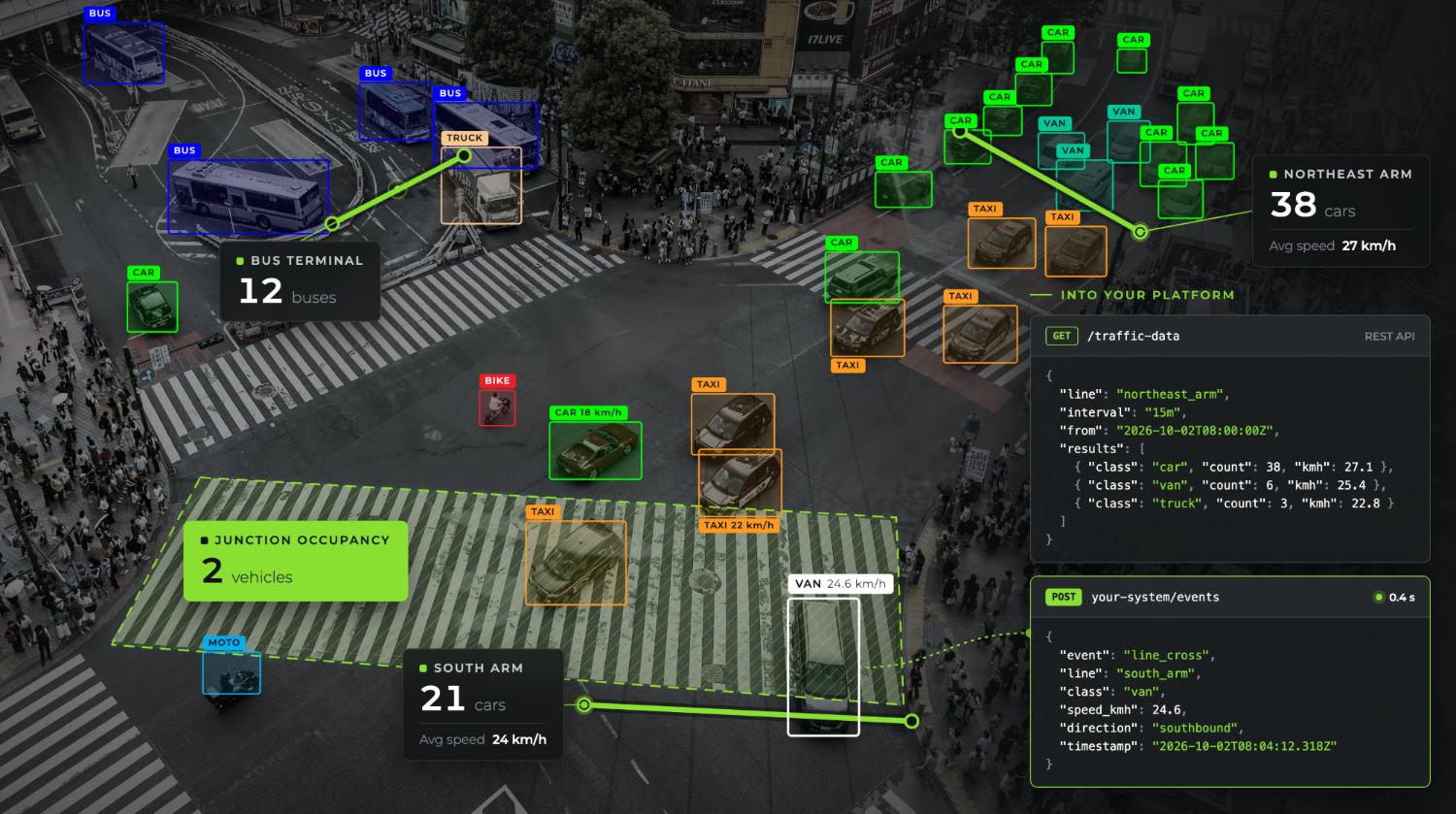
Every Live Traffic event leaves as structured data over HTTPS as it happens, and every measure is available through the REST API. The same data feeds live dashboards and Excel reports. You can run GoodVision as a data layer for your own systems or as an all-in-one platform where your operators work.
HTTPS Events
Alarms, notifications and structured event data go straight to traffic controllers, dashboards and traffic management systems.
REST API
Counts, speeds, occupancy and every extracted parameter, aggregated from 1 second to 24 hours, filtered by class and lane, with image snapshots of events.
Live Dashboards
Widgets start from a scenario and show counts as a single value or a pie, bar or line graph, over 15 minutes to 31 days.
Excel Reports
Seven .xls reports: Count, Event, Average Speed, 85th Percentile Speed, Average Time Gap, Traffic Flow and Traffic Density.
Where Live Traffic Connects
Live Traffic integrates through APIs with:
- Traffic management centers and traffic operations dashboards
- Signal controllers
- Smart city platforms
- Enforcement systems
- V2X platforms and emergency response systems
For endpoints and data formats, see Raw Data and APIs.
What Hardware Do You Need for Live Traffic?
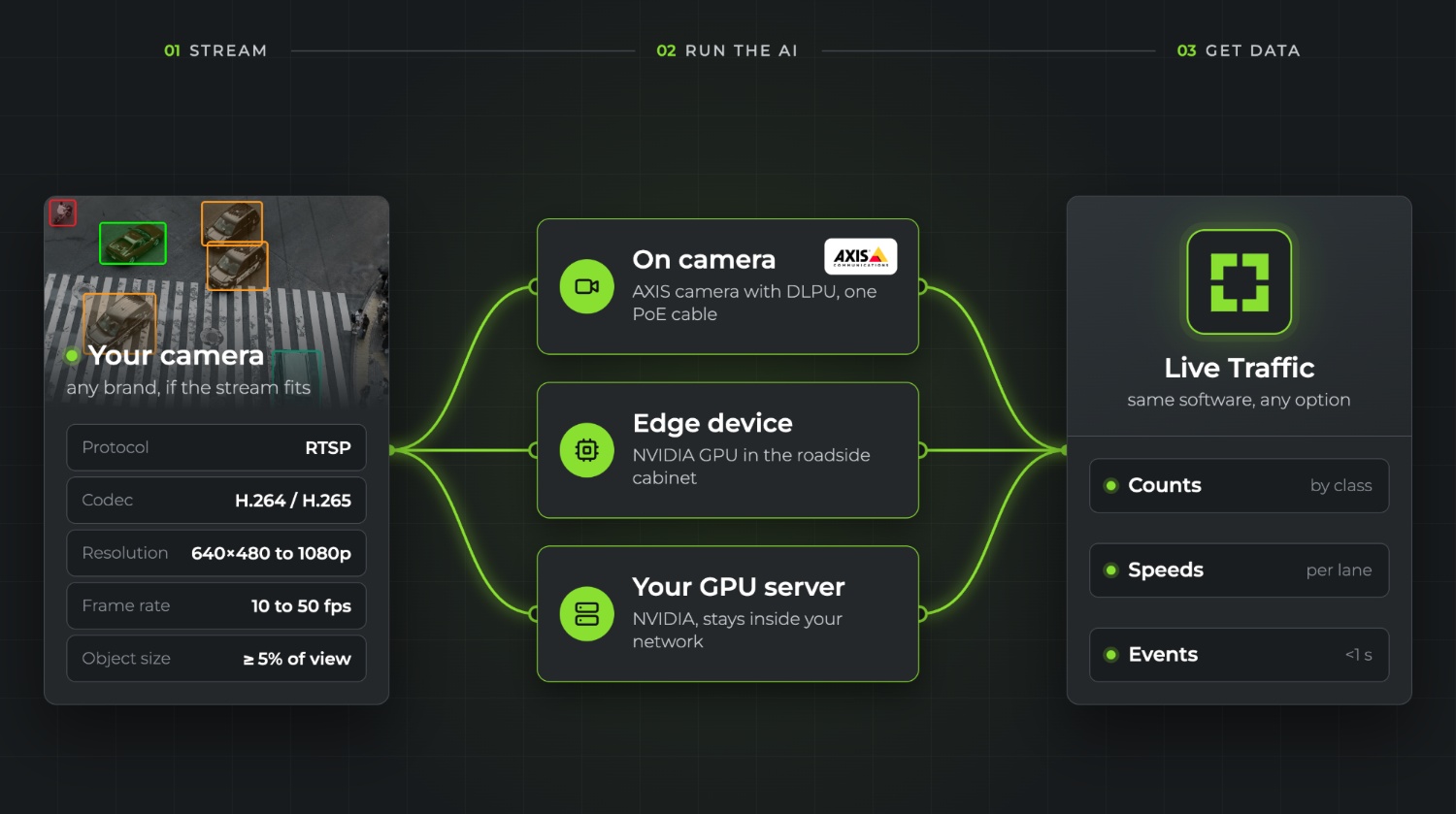
You don't need hardware from GoodVision, though we can supply it. Live Traffic runs on commercially available equipment in one of three places: inside an AXIS® camera with a DLPU, on an edge device with an NVIDIA GPU in the roadside cabinet, or on your own GPU server. Have a different AI camera or edge device in mind? Contact us. Your existing cameras stay, as long as their streams meet the requirements below.
On-Camera
The AI runs on the camera itself. GoodVision runs on AXIS® cameras with a DLPU. Power and data share one PoE network cable, and a temporary site adds an LTE or 5G router. Have a different AI camera in mind? Contact us.
Edge Device
A commercially available edge computer with an NVIDIA GPU sits in the cabinet next to your cameras and reads their streams on site. We recommend the reComputer Industrial J4012. Have a different edge device in mind? Contact us.
Your Own GPU Server
Run the engine on your own NVIDIA GPU server, with any camera you already operate. The processing stays inside your network.
Camera Stream Requirements
Any camera brand works if its stream meets these figures:
- Protocol: RTSP
- Codec: H.264 or H.265
- Resolution: 640x480 to 1920x1080
- Frame rate: 10 to 50 frames per second
- Object size: road users fill at least 5% of the camera view
GoodVision is software, so you choose the hardware. Our engineers recommend the best-performing device for each site and check a sample stream before you commit. For the full comparison, see Deployment Topologies.
How Does a Live Traffic Deployment Work?
A Live Traffic deployment connects your cameras, existing CCTV or supported AI cameras, to GoodVision processing, then configures what each camera watches. Our engineers check your streams first. You then choose where processing runs, set up scenarios per camera and route the events to your systems. GoodVision also runs proof-of-concept deployments before a full rollout.
1. Check a Sample Stream
Send us a stream or a recording. Our engineers check it against the camera requirements before anything is installed.
2. Choose Where It Runs
On the camera, on an edge device or on your own server, depending on your network, bandwidth and data-residency rules.
3. Configure Scenarios
Draw lines and zones on each camera view, and set trigger criteria by direction, lane and vehicle class.
4. Connect Your Systems
Route events over HTTPS, pull data through the API or work in the GoodVision dashboards. Scale from a single camera to thousands.
Watch the Full Walkthrough
In the full 15-minute walkthrough, our CTO and Product Owner show you how to detect incidents as they happen, track every road user and bring live traffic data into your traffic management systems. Watch the full walkthrough.
Who Uses GoodVision Live Traffic?
Live Traffic serves teams that act on traffic as it happens. Highway and tollway operators use it for incident detection and corridor monitoring, cities for intersections, violations and parking, and system integrators build it into the systems they sell. Each card links to the page for that team or capability.
Highway and Tollway Operators
Automatic incident detection, toll lane capacity and live corridor monitoring on your existing CCTV.
Cities and Municipalities
Intersection counts, violations and parking on junction and street CCTV or supported AI cameras.
System Integrators
Build Live Traffic into your offer through the REST API and HTTPS events.
Real-Time Traffic Monitoring
Live counts, flow, speed, density and congestion per lane, for highways and cities.
Intersection Monitoring
Counts per approach and movement, live, from junction cameras.
Parking Monitoring
Illegal parking detection and parking analytics on your existing CCTV or a supported camera.
Questions About Live Traffic
These answers cover what operators and integrators ask first: which cameras work, whether GoodVision can supply the hardware, how accurate it is, how fast alerts arrive, how it differs from Video Insights and when predictions appear. Each answer gives you the figure behind it, so you can check it against your own network.
Does Live Traffic Work With Our Existing Cameras?
In most cases, yes. Any camera brand works if it delivers an RTSP stream in H.264 or H.265, from 640x480 to 1920x1080, at 10 to 50 frames per second.
Can GoodVision Supply the Hardware?
Yes. GoodVision is software and does not manufacture hardware, but we deliver the device each site needs as part of the project, AXIS® cameras included. We pass through the manufacturer's warranty and handle warranty claims as your single contact. You can also run Live Traffic on cameras you already have.
How Accurate Is Live Traffic?
95%+ on counts and classifications, validated against manual counts. It runs in all weather and lighting conditions.
How Fast Do Alerts Arrive?
Each event is pushed to your systems over HTTPS as soon as it is detected, so delivery time depends on your network. When Live Traffic runs on an AXIS camera, the camera's own output can trigger roadside warning equipment within one second of the event being confirmed, even with no connection.
How Is It Different From Video Insights?
Live Traffic monitors live streams continuously. Video Insights analyzes recorded video for surveys and studies. Both run on the same platform.
Can Live Traffic Track Road Users Across Several Cameras?
Yes. Multi-camera tracking joins the cameras at an intersection into one data source on a shared live map. Live Traffic tracks every road user across all of their streams and counts turning movements for the whole intersection.
When Do Traffic Predictions Appear?
After about three months. The prediction model trains and calibrates on your own data first, and predictions start once calibration is done.
Does GoodVision Detect Crashes?
No. It measures near-collisions with PET and TTC. Incident detection covers wrong-way drivers, stopped vehicles and congestion.
How Long Is Data Kept?
Standard data storage is included with each license. You can increase storage on demand and choose a different retention period.
See Live Traffic on Your Own Cameras
Send us a stream or a recording from one of your cameras and we will show you the events and the data it already contains.